

Y’know what’s wild? The app that saved my sanity during first-trimester nausea became basically useless by month seven when I needed contraction timers and hospital bag checklists. Your pregnancy journey shifts dramatically every twelve weeks, and your tracking tools should shift with you. Some apps excel at early symptom logging while others shine during late-stage prep—rarely does one platform nail everything. Based on testing throughout complete pregnancy cycles and analyzing tools featured in our master guide to pregnancy tracking solutions, here’s exactly which apps deliver when you need them most.
I learned this the hard way with my first pregnancy. Downloaded this supposedly comprehensive app everyone raved about, and yeah it was great for tracking morning sickness and early symptoms. But by third trimester when I needed kick counting and labor prep guidance, I was frustrated constantly with how the app prioritized content I didn’t need anymore while burying stuff I desperately wanted.
Some apps excel at early symptom logging while others shine during late-stage prep. Rarely does one platform nail everything equally across all three trimesters. After going through this three times myself and testing probably fifteen different apps at various stages, I’ve figured out which tools actually deliver when you need them most and which ones peak too early or start strong way too late.
First Trimester: When You Need Reassurance and Symptom Validation
What’s Actually Happening in Weeks 1-13
Let’s be honest—first trimester is rough for most of us. You’re exhausted beyond belief, possibly puking multiple times daily, your body feels completely foreign, and you probably can’t tell anyone yet so you’re suffering in secret. Oh and your anxiety is through the roof because every twinge has you convinced something’s wrong.
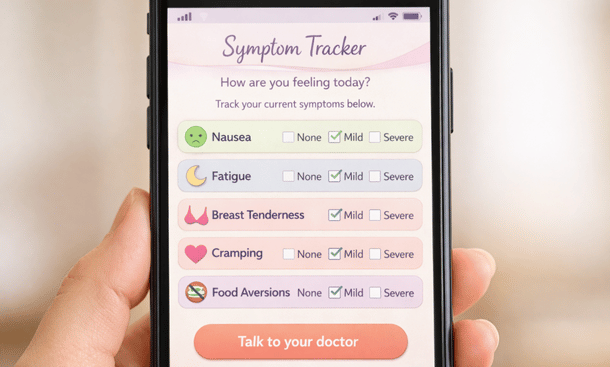
This is when you need an app that functions like a knowledgeable, calming friend who’s been through it before. You don’t need complex features or overwhelming information. You need reassurance that yes, this level of exhaustion is normal. Yes, food aversions this strong are common. No, that cramping probably isn’t a problem but here’s when you should actually call your doctor.
Apps That Actually Get First Trimester Right
Ovia Pregnancy absolutely nails early pregnancy tracking. Their symptom logger is ridiculously comprehensive without being overwhelming—you can track everything from nausea intensity to mood swings to weird food cravings. What makes it clutch for first trimester specifically is how they contextualize symptoms immediately with “this is totally normal” or “worth mentioning to your provider” guidance built right into the tracking.
The daily tips focus heavily on early pregnancy concerns which sounds obvious but plenty of apps skip this. When you’re week six and terrified, you don’t want generic pregnancy advice—you want specific information about what’s happening RIGHT NOW in your body.
Pregnancy+ deserves mention here because their 3D visualization of fetal development is genuinely comforting in first trimester. When you can’t feel anything yet and don’t look pregnant, seeing that detailed visual representation of your growing baby helps make it feel real. Their daily updates are also timed perfectly for early pregnancy anxiety, giving you concrete milestones to focus on instead of just worrying.
What to Expect has the community advantage during first trimester. Their birth month groups connect you with women at the exact same stage, which is invaluable when you’re newly pregnant and have seventeen questions daily. The app itself is solid for basic tracking but the community is really where it shines early on.
Features That Matter Most Right Now
Comprehensive symptom tracking tops the list because first trimester symptoms are intense and varied. You need space to log nausea, food aversions, fatigue levels, cramping, spotting if it happens, breast tenderness, headaches, mood swings—basically everything your body throws at you. Apps that limit symptom entries or offer too few options to choose from get frustrating fast.
Weekly development updates with medical accuracy keep you grounded. You want to know that organs are forming, that the heartbeat starts around week six, that movements begin even though you can’t feel them yet. This information combats anxiety by giving you concrete developmental milestones to focus on instead of just symptoms.
Miscarriage risk information presented sensitively matters more than most apps acknowledge. First trimester carries the highest miscarriage risk and pretending that doesn’t exist doesn’t help anyone. Good apps provide factual information about decreasing risk as weeks progress without being alarmist or depressing about it.
Easy appointment tracking because first trimester comes with that initial confirmation visit, usually an early ultrasound, maybe additional monitoring if you’re high-risk. You need simple calendar integration and reminders so you don’t miss anything when pregnancy brain already has you forgetting your own phone number.
Second Trimester: When You Actually Enjoy Being Pregnant
The Golden Trimester Reality
Second trimester is when pregnancy typically gets enjoyable, or at least tolerable. Nausea usually fades, energy returns somewhat, you start showing, and you’ll feel those first magical kicks. This is when pregnancy apps can get really fun instead of just functional because you’re not constantly managing miserable symptoms.
Your needs shift from symptom management and anxiety relief to engagement with the pregnancy experience. You want to track movement, see detailed anatomy scan results, start planning nursery stuff, maybe take those bump photos you actually want to remember. The apps that work best now are the ones that celebrate this phase instead of just providing medical information.
Apps That Shine in the Middle Months
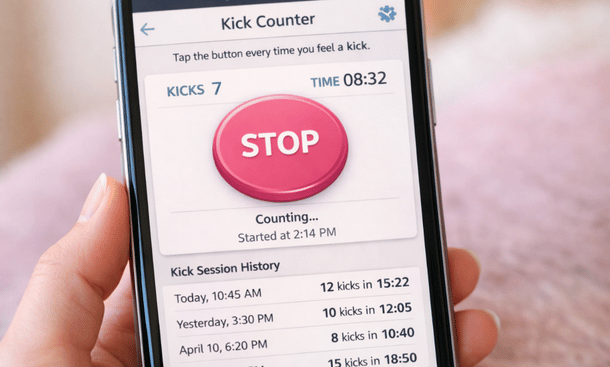
Glow Nurture becomes incredibly useful in second trimester specifically because of how they handle movement tracking and biometric data. Once you start feeling kicks around week eighteen to twenty, their kick counter is intuitive and actually encourages you to pay attention to patterns without making it feel like homework. They also integrate weight tracking, measurements, and other biometric data really well if you’re into that level of detail.
Baby Center hits its stride during second trimester with their week-by-week content perfectly timed to this phase. Their articles about anatomy scans, glucose testing, and preparing for baby are substantial without being overwhelming. The size comparisons get more meaningful now when your baby graduates from produce to actual recognizable objects and their 3D images are detailed enough to be impressive.
Pregnancy Tracker by Babycenter is criminally underrated for second trimester because their photo timeline feature is perfect for this phase when you’re actually showing and might want to document it. The built-in bump photo guides with consistent angles and lighting tips help you create a cohesive pregnancy photo series if that’s your thing.
What You Actually Need Now
Movement and kick tracking becomes essential starting around week twenty when you should begin feeling regular movement. Apps need to make this easy and automatic because you’ll be doing it frequently. The best ones let you set reminders to check for movement and log it with minimal taps because you’re probably tracking this multiple times daily toward the end of second trimester.
Detailed anatomy scan information helps you understand what they’re checking at that big twenty-week ultrasound. Good apps explain each measurement and what they’re looking for without making you spiral into Google rabbit holes about potential problems.
Glucose test prep and results tracking because pretty much everyone gets screened for gestational diabetes between weeks twenty-four and twenty-eight. Apps that help you prepare for this test and track results if you need follow-up testing save you from managing this information across multiple platforms.
Nursery planning and registry tools start becoming relevant. Some apps integrate shopping features and checklists which is either super helpful or annoying depending on your personality. At minimum you want access to organizational tools for tracking what you still need to buy or set up.
Third Trimester: When Practical Tools Beat Pretty Features
The Final Stretch Needs Different Support
Third trimester is when pregnancy stops being cute and starts being legitimately uncomfortable. You’re huge, exhausted again, probably not sleeping well, getting increasingly anxious about labor, and dealing with lovely symptoms like heartburn, frequent urination, and Braxton Hicks contractions that make you second-guess everything.
This is when you need an app that functions like a practical, experienced coach rather than a cheerleader. You don’t care about cute fruit size comparisons anymore. You want contraction timers that actually work, hospital bag checklists you’ll actually use, and clear guidance about when to call your doctor versus when to stay home.
Apps Built for Late Pregnancy
Full Term is literally designed for third trimester and it shows. Their contraction timer is the most intuitive I’ve used, their hospital bag checklist is comprehensive without being ridiculous, and they include birth plan templates that actually help you articulate preferences instead of just listing random options. If you only download one app specifically for late pregnancy, this is the one.
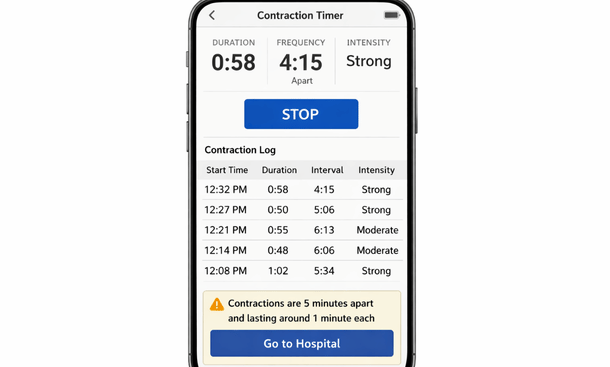
Contraction Timer & Counter sounds basic but it does one thing extremely well which matters more than doing ten things poorly. When labor starts, you need a timer that works instantly without setup or confusion. This app nails it with simple start/stop buttons, automatic calculations, and data you can share directly with your provider.
Pregnancy Tracker (the more comprehensive version, not just kick counter) becomes invaluable in third trimester for their appointment scheduling features and birth plan tools. They integrate with calendar apps seamlessly and send reminders for those increasingly frequent weekly appointments. Their birth preferences questionnaire helps you think through decisions before you’re in active labor.
Features You’ll Actually Use Now
Reliable contraction timer is absolutely non-negotiable. Test this feature before you’re actually in labor because you need to know it works and you understand the interface. It should track duration, frequency, and ideally intensity. Bonus points if it can share data with your partner or doctor and includes guidance about when to head to the hospital.
Hospital bag checklists save you from panicking and overpacking or forgetting crucial items. Good apps let you customize these lists and check items off as you pack. Some even remind you about things people commonly forget like phone chargers, snacks, and going-home outfits.
Birth plan templates help you organize preferences about pain management, interventions, immediate postpartum care, and other decisions you’ll need to communicate. Apps that walk you through these choices systematically are better than blank templates because they prompt you to consider things you might not think about independently.
Labor preparation content matters if you’re anxious about birth or want to feel more prepared. This includes information about labor stages, pain management options, medical interventions, and postpartum recovery. Apps that provide this content in digestible chunks instead of overwhelming walls of text win here.
Postpartum preparation because third trimester is when you should be thinking about recovery, breastfeeding or formula feeding setup, pediatrician selection, and other logistics. Apps that bridge pregnancy into postpartum instead of just ending at delivery provide more complete value.
The Switching Strategy Nobody Talks About
Here’s something most people don’t realize: you don’t have to use the same app for your entire pregnancy. It’s totally fine to switch apps between trimesters when your needs change, and honestly it’s often the smarter approach than forcing one app to serve purposes it wasn’t designed for.
I used Ovia heavily in first trimester, switched to Baby Center for most of second trimester when I wanted better community and visual features, then added Full Term in third trimester specifically for contraction timing and birth prep. Did this create slightly fragmented data? Sure. Did it give me better tools at each stage? Absolutely.
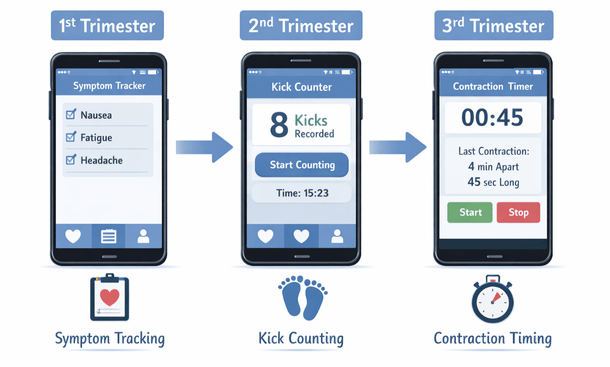
The key is starting each transition deliberately. Around week twelve to thirteen, evaluate whether your current app will serve second trimester needs or if you should explore options. Same around week twenty-seven to twenty-eight before third trimester begins. This gives you time to set up new apps and familiarize yourself with different interfaces before you desperately need specific features.
If you do switch apps, screenshot or export any tracking data you want to preserve. Most apps let you export health data to keep for your records or share with providers, even if you’re moving to a different platform.
Making the Right Choice for Your Timeline
The honest truth is that no single app perfectly serves all three trimesters equally. Some try, most fail to excel at everything. The apps that market themselves as comprehensive often end up mediocre across the board instead of excellent at anything specific.
Think about your personality and priorities. If you hate managing multiple apps and want everything in one place even if individual features aren’t perfect, stick with one solid all-around option like Ovia or What to Expect. If you’re comfortable using different tools for different purposes and want the best functionality at each stage, strategic app-switching makes more sense.
Consider your specific circumstances too. High-risk pregnancies need more robust medical tracking from day one through delivery. Uncomplicated pregnancies can get away with simpler tools. First-time moms usually want more hand-holding and educational content. Experienced moms often just want efficient tracking without the explanatory fluff.
Budget matters especially if you’re considering premium features. Paying for three different premium apps across your pregnancy gets expensive fast. Sometimes one premium app for all nine months costs less than multiple shorter-term subscriptions, even if the individual app isn’t perfect for every stage.
Before you commit to any approach—whether that’s one app for the long haul or strategic switching—it helps to understand what premium features actually deliver versus what’s just marketing hype. Check out our free vs paid pregnancy apps analysis to figure out whether those locked premium features are genuinely worth paying for at different pregnancy stages, or if free versions will handle your trimester-specific needs just fine without the upgrade pressure.
Your pregnancy is unique to you and your app strategy should be too. Don’t let anyone make you feel weird for using four different apps or for stubbornly sticking with one that works for you even if it’s not the trendy choice. The best app is whichever one you’ll actually use when you need it, whether that’s the same app for nine months or a different one every trimester.

As an author at Felyro.com, I create actionable content on pregnancy tracking, offering practical tools, tips, and insights that empower mothers-to-be to stay informed and confident throughout their pregnancy.