
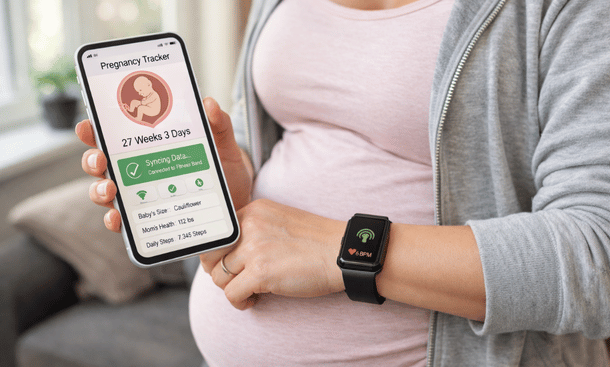
Here’s the deal: if you’re already wearing a Fitbit or Apple Watch tracking sleep, steps, and heart rate, why manually enter that data into yet another app? The smartest pregnancy platforms pull existing health metrics automatically, giving you a complete picture without double-entry headaches.
I learned this the hard way during my second pregnancy. Had my Fitbit tracking sleep quality, daily activity, resting heart rate—all super relevant pregnancy metrics. Downloaded this pregnancy app everyone loved but it wanted me to manually log sleep hours every single morning. I’d literally be standing there looking at detailed sleep data on my Fitbit app, then typing “7 hours” into the pregnancy app like some kind of medieval data entry clerk. Made zero sense.
By my third pregnancy I got smart about it and only used apps that actually talked to my existing devices. Suddenly my pregnancy tracking became way more comprehensive without requiring any additional effort. Sleep patterns, activity levels, heart rate changes throughout pregnancy—all automatically logged and analyzed together with pregnancy-specific symptoms and milestones. That’s how tracking should work in 2026.
After testing integration features across most major pregnancy apps with multiple device ecosystems, I’m breaking down which platforms sync seamlessly with which wearables, what data actually transfers versus what claims to sync but barely functions, and whether these integrations genuinely improve your tracking experience or just add complexity you don’t need.
Why Device Integration Actually Matters for Pregnancy
Beyond Convenience to Better Health Insights
Look, syncing your Fitbit to your pregnancy app isn’t just about saving thirty seconds of manual data entry each day, though that’s definitely a perk. The real value comes from how integrated data creates more comprehensive health pictures than either system provides alone.
Pregnancy changes literally everything about your body’s baseline metrics. Your resting heart rate increases by like ten to twenty beats per minute. Sleep patterns get disrupted by hormones, discomfort, and constant bathroom trips. Activity levels shift as you adjust to growing a human. If you’re manually tracking this stuff or not tracking it at all, you’re missing patterns that automated integration catches automatically.
Your Fitbit notices your heart rate is elevated but doesn’t know you’re pregnant so it can’t contextualize whether that’s normal pregnancy changes or something concerning. Your pregnancy app knows you’re twenty weeks along but without biometric data it can’t tell you that your activity has dropped significantly or your sleep quality is tanking. Connected together, they provide context neither system offers independently.
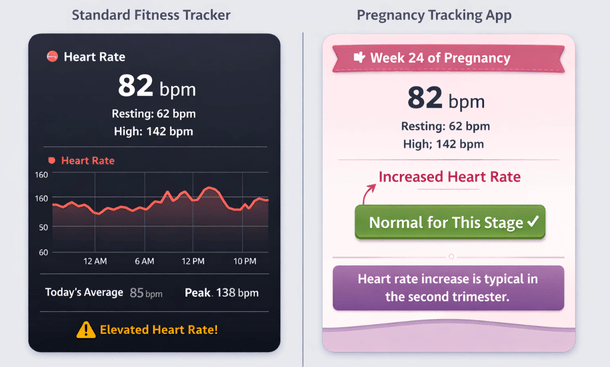
Some pregnancy complications show up first in biometric data that wearables track continuously. Preeclampsia can cause elevated heart rate and disrupted sleep patterns before you notice obvious symptoms. Gestational diabetes affects activity tolerance and energy levels. While wearables absolutely aren’t diagnostic tools and can’t replace medical care, patterns they identify might prompt conversations with your provider earlier than you’d otherwise have them.
The postpartum period is where integration becomes especially valuable but hardly anyone thinks about this when choosing pregnancy apps. Those first weeks with a newborn, sleep deprivation reaches epic levels and physical recovery is intense. Having your device automatically track sleep, activity, and recovery metrics means you’re monitoring your health even when you’re too exhausted to remember to open an app.
What Data Actually Syncs (And What Doesn’t)
Not all integrations are created equal and apps love claiming they “integrate” with devices when the actual data exchange is pretty limited. Understanding what information actually transfers versus what’s just marketing helps set realistic expectations.
Sleep tracking typically syncs well across most integrations. Total sleep time, sleep stages if your device tracks them, wake times, and sleep quality scores usually transfer automatically. This is clutch during pregnancy when sleep becomes increasingly difficult and you want to understand patterns without having to remember details from last night when you were half-conscious.
Activity and step counts are standard integration data that almost every connected app pulls successfully. Daily steps, active minutes, exercise sessions, calories burned—this basic fitness data transfers reliably. During pregnancy this helps you monitor whether you’re maintaining recommended activity levels or if fatigue is significantly reducing movement.
Heart rate data integration varies widely. Some apps pull resting heart rate daily which is useful for tracking pregnancy-related increases. Others access continuous heart rate if your device provides it, giving you way more detailed cardiovascular data. A few barely use heart rate data even when it’s available, which is frustrating when that’s one of the most relevant pregnancy metrics.
Weight tracking sometimes syncs from smart scales but this is hit or miss. Many pregnancy apps want you to enter weight manually even if you have a connected scale that could provide it automatically. When weight sync does work, it’s convenient and ensures consistent tracking without forgetting or estimating.
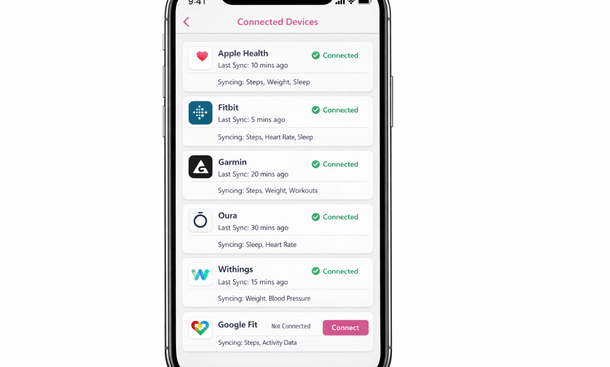
Nutrition logging rarely transfers between fitness apps and pregnancy apps even though both might track it. You’ll probably still be manually entering food and water intake in your pregnancy app even if you’re religious about logging everything in MyFitnessPal or whatever nutrition tracker you use. This seems like an obvious integration opportunity but most apps haven’t figured it out yet.
Menstrual cycle data becomes relevant if you used cycle tracking before pregnancy and want that historical data connected to your pregnancy timeline. Apple Health and some other platforms track periods and fertility data that pregnancy apps can pull to establish conception dates and early pregnancy timelines.
Apple Health Integration: The iOS Advantage
How Pregnancy Apps Tap Into Apple’s Health Ecosystem
If you’re Team iPhone, Apple Health creates a centralized health data hub that pregnancy apps can connect to pretty seamlessly. Apple built the infrastructure well so integration is usually cleaner than other platforms, though individual app implementation still varies.
Apple Health pulls data automatically from your Apple Watch if you wear one, plus it aggregates information from any other health apps you use that write to Health. This means your pregnancy app can access data from multiple sources through one integration instead of needing separate connections to each device or service.
Ovia has probably the strongest Apple Health integration among pregnancy apps. They pull sleep, activity, heart rate, weight, and even some less obvious metrics like basal body temperature if you track it. The sync is bidirectional too—pregnancy-specific data you log in Ovia writes back to Apple Health, creating a complete health record across platforms.
Glow Nurture also does Apple Health well, with particularly good implementation of cycle tracking data flowing into pregnancy timelines. If you used Glow for period tracking before pregnancy, that historical data connects smoothly when you transition to their pregnancy app through Apple Health integration.
Pregnancy+ connects to Apple Health but the implementation is more basic than Ovia or Glow. You get activity and sleep data transferred but not much of the deeper biometric information. It’s functional rather than comprehensive—works fine if you just want step counts and sleep hours without detailed analysis.
Setting Up Apple Health Integration Properly
Getting pregnancy apps to actually talk to Apple Health requires specific permission setup that’s not always intuitive. Apps can’t just grab your health data automatically—you need to explicitly grant access to specific categories.
When you first connect a pregnancy app to Apple Health, it’ll request permissions for various data types. Don’t just tap “allow all” without thinking because you might be giving access to stuff you don’t want to share. Review the list and grant access only to relevant categories like activity, sleep, heart rate, weight, and reproductive health.
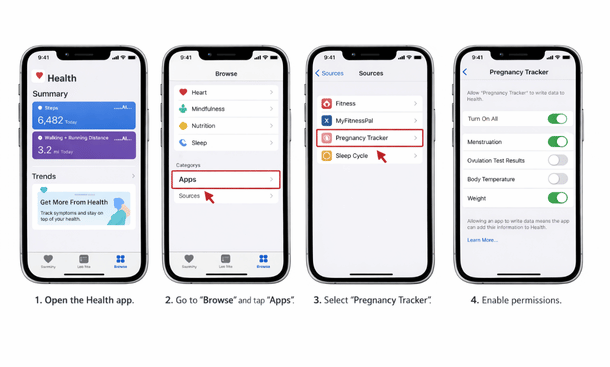
Check your Health app settings periodically because apps sometimes request additional permissions after updates or when you start using new features. Go to Health app, tap your profile, scroll to Apps, and review which apps have access to what data. You can revoke or modify permissions anytime if you realize an app is pulling data you’re not comfortable sharing.
Make sure data is actually flowing both directions if you want it to. Some apps read from Apple Health but don’t write data back, which means your pregnancy tracking isn’t reflected in your overall health record. Check each app’s settings to enable writing data to Health if that option exists and you want comprehensive records.
Watch for sync conflicts when multiple apps track the same metrics. If both your pregnancy app and fitness app are logging workouts to Apple Health, you might end up with duplicate entries or conflicting data. Designate one primary source for each data type to keep your Health records clean.
Fitbit Integration: Android’s Strongest Option
Making Pregnancy Apps Work With Fitbit Devices
Fitbit has massive user base and their devices track pregnancy-relevant metrics really well, but integration with pregnancy apps is honestly hit or miss. Fitbit’s ecosystem is more closed than Apple Health so fewer pregnancy apps have robust connections.
Ovia again leads here with the best Fitbit integration among pregnancy apps. They’ve invested in building solid connections that pull comprehensive data from Fitbit devices. Sleep stages, heart rate, activity, even stress management metrics if your Fitbit tracks them—most of it transfers into Ovia’s pregnancy tracking interface.
The sync isn’t quite as seamless as Apple Health integration because you’re connecting two separate platforms rather than one unified health ecosystem. You’ll need to authenticate Fitbit separately and occasionally reauthorize the connection when tokens expire. Slightly more maintenance than Apple Health but still way better than manual entry.
Glow also offers Fitbit integration though it’s less comprehensive than their Apple Health connection. Basic metrics transfer reliably but some of the deeper Fitbit data doesn’t make it across. If you’re primarily interested in step counts and sleep hours rather than detailed analysis, it works fine.
Many pregnancy apps claim Fitbit compatibility but when you dig deeper it’s through third-party services or requires premium subscriptions to access. Read the fine print before assuming any pregnancy app will talk to your Fitbit device automatically.
Fitbit Premium and Pregnancy Tracking
Fitbit’s own pregnancy tracking features within Fitbit Premium deserve mention because if you’re already paying for Premium, you might not need a separate pregnancy app at all—or you might want to use Fitbit as your primary tracker and pregnancy apps as supplementary tools.
Fitbit Premium includes pregnancy mode with week-by-week content, symptom tracking, and biometric insights specifically contextualized for pregnancy. Since it’s built into the Fitbit ecosystem, all your device data is obviously integrated seamlessly without any third-party connections required.
The downside is Fitbit’s pregnancy features aren’t as comprehensive as dedicated pregnancy apps. You don’t get detailed fetal development information, contraction timers, robust community features, or many of the pregnancy-specific tools standalone apps provide. But for basic tracking integrated with your biometric data, it’s surprisingly solid.
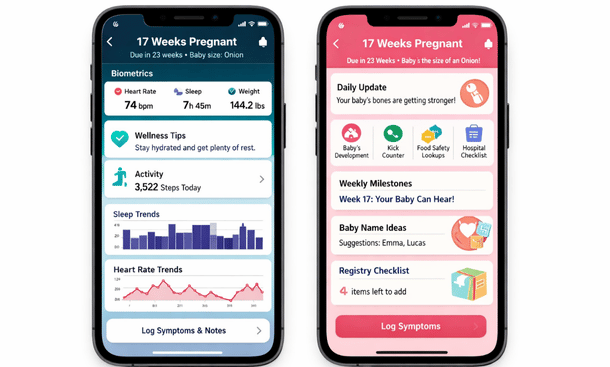
If you use Fitbit Premium for pregnancy tracking, you can still connect other pregnancy apps to pull that same data for different features. Use Fitbit as your data collection and biometric analysis platform, then connect Ovia or Glow when you want pregnancy-specific guidance, community access, or specialized tools.
Other Wearables: Garmin, Samsung, and Beyond
Integration Options Beyond the Big Two
Apple Watch and Fitbit dominate the wearable market but plenty of people use Garmin devices, Samsung watches, or other alternatives. Integration options for these platforms with pregnancy apps are generally weaker but some connections exist.
Garmin users have limited options because Garmin’s ecosystem is even more closed than Fitbit’s. A few pregnancy apps claim Garmin compatibility but it’s usually indirect—through Google Fit on Android or through manual export/import rather than automatic sync. If pregnancy app integration is important to you, Garmin devices make this challenging.
That said, Garmin’s own Connect app tracks relevant pregnancy metrics extremely well even without dedicated pregnancy features. If you’re willing to use multiple apps, tracking biometrics in Garmin Connect while using a separate pregnancy app for pregnancy-specific features works fine—just accept you’re managing data across platforms without automatic integration.
Samsung Health serves as a health data hub similar to Apple Health for Samsung device users. Some pregnancy apps integrate with Samsung Health to pull data from Galaxy Watches and other Samsung wearables. The ecosystem isn’t as mature as Apple’s but it’s improving and covers basic integration needs for activity, sleep, and heart rate.
Oura Ring is popular among pregnancy tracking communities despite being less mainstream than watches. The ring excels at sleep and recovery tracking which are super relevant during pregnancy. Integration with pregnancy apps is minimal though—you’re mostly using Oura’s app for biometrics while managing pregnancy tracking separately.
Google Fit as a Universal Bridge
Google Fit functions as an aggregation platform similar to Apple Health but for Android users. It pulls data from various devices and apps, theoretically creating one place pregnancy apps can connect to instead of needing individual integrations with every device manufacturer.
In practice, Google Fit integration among pregnancy apps is inconsistent. Some apps use it well, others barely support it despite claiming compatibility. The data transfer also tends to be less comprehensive than direct device integrations—you’ll get basic metrics but miss some of the deeper biometric insights.
If you’re using an Android device with a less common wearable, Google Fit might be your best integration path. Connect your wearable to Google Fit, then connect your pregnancy app to Google Fit, and hope the data flows through both connections successfully. It works but requires more troubleshooting than Apple’s more cohesive ecosystem.
When Integration Creates More Problems Than Solutions
The Dark Side of Connected Everything
Automatic data syncing sounds great in theory but sometimes integrated systems create frustrations that manual tracking avoids. Knowing when integration helps versus when it’s just added complexity matters for choosing the right setup.
Sync failures happen constantly and they’re annoying. Your Fitbit didn’t sync to your phone, your phone didn’t sync to the pregnancy app, now your data from yesterday is missing and you’re not sure which connection failed. Manually entering data takes longer but it’s reliable—you know exactly what got recorded and when.
Battery drain increases when you’re running multiple connected apps constantly syncing data back and forth. Your pregnancy app is pulling from Apple Health which is pulling from your Apple Watch which is also pushing data to fitness apps—all this background activity impacts phone battery life noticeably.
Privacy concerns multiply with integration. Instead of one company having your pregnancy data, now your wearable company, your phone’s health platform, and your pregnancy app all have access. Each integration point is another potential data exposure risk as we covered earlier when discussing privacy.
Data accuracy issues arise when automated systems misinterpret information. Your Fitbit thinks you’re sleeping when you’re actually just lying on the couch watching Netflix, logs it as sleep, pregnancy app pulls that data and thinks your sleep patterns are different than they actually are. Manual logging lets you correct these misinterpretations.
Over-reliance on devices means you might stop paying attention to how you actually feel in favor of what your metrics say. Pregnancy is one time when listening to your body matters more than what devices tell you. If you feel exhausted but your Fitbit says you got decent sleep, your subjective experience is more important than the data.
Making Integration Actually Work for You
Practical Setup Tips for Seamless Syncing
If you’re committed to using integrated tracking—and honestly it does work well when set up properly—here’s how to maximize functionality while minimizing frustration.
Start with one primary integration rather than trying to connect everything simultaneously. Get your main wearable syncing reliably with your pregnancy app first, make sure data flows correctly for a few days, then consider adding additional connections if needed. Troubleshooting one integration is manageable, troubleshooting five simultaneous connections is a nightmare.
Set a daily sync schedule where you open apps in the right order to trigger data transfers. Wearable app first to pull data from device, health platform second to aggregate data, pregnancy app last to pull everything together. Sounds tedious but establishing this routine makes sync failures way less common.
Enable notifications for sync failures so you know immediately when connections break instead of discovering missing data days later. Most apps can alert you when expected data doesn’t arrive, letting you troubleshoot quickly.
Keep backup manual logs for the most important metrics even when integration is working. If your entire data history lives in connected systems and something breaks catastrophically, you’ve lost everything. Quick daily notes about key symptoms or measurements provide backup records that survive technical failures.
Update apps and devices regularly because integration features improve with updates and sync problems often get fixed in new versions. Enable automatic updates for health-related apps so you’re always running the most stable version.
Review connected data weekly to verify accuracy and completeness. Don’t just trust that everything synced correctly—actually look at your pregnancy app’s data logs and confirm the information matches what your devices recorded. Catching errors early makes correction easier.
Is Integration Worth the Effort?
Honest Assessment of Value vs Complexity
After using both integrated and standalone pregnancy tracking across multiple pregnancies, my honest take is that integration value depends heavily on your specific situation and how much you already use wearables for health tracking.
If you’re someone who already lives in their Fitbit or Apple Watch data, wears it constantly, and trusts the metrics, integration with pregnancy apps is absolutely worth it. You’re already collecting all this relevant data so automatically incorporating it into pregnancy tracking makes total sense. The setup effort pays off in more comprehensive insights without additional daily effort.
If you’re not really a wearables person or you only wear devices occasionally for workouts, pregnancy app integration probably adds complexity without proportional value. You’re better off with a straightforward pregnancy app that doesn’t depend on external data sources. Manual logging of the few metrics you care about takes less time than troubleshooting flaky integrations.
For high-risk pregnancies requiring close monitoring, integrated tracking can help you and your provider spot concerning patterns earlier. The continuous biometric monitoring wearables provide combined with pregnancy-specific tracking creates detailed health records useful for medical decision-making.
For uncomplicated, low-risk pregnancies, integration is nice-to-have rather than essential. You’ll get through pregnancy just fine with basic tracking whether or not your step count automatically syncs to your pregnancy app.
The postpartum period tips the scales toward integration being genuinely valuable regardless of pregnancy risk level. Those exhausting early weeks with a newborn, automatic tracking of your sleep and recovery helps monitor your wellbeing when you’re too depleted to do it manually. If your pregnancy app continues into postpartum—and the good ones do—integration becomes increasingly worthwhile after delivery.
Now that you understand how device integration works and whether it’s worth the setup effort for your situation, you might be wondering which specific features actually justify choosing one app over another beyond just connectivity. Our guide covering essential features every pregnancy app should have breaks down which tracking tools, educational content, and support resources matter most at different stages—because seamless Fitbit sync is nice but it doesn’t mean much if the app itself is missing functionality you’ll actually use daily throughout your pregnancy journey.
Bottom line: integration is a tool that serves some users extremely well and adds unnecessary complexity for others. Be honest about your technology comfort level and how much you actually engage with wearable device data before committing to pregnancy apps that require integrated ecosystems to function properly.

As an author at Felyro.com, I create actionable content on pregnancy tracking, offering practical tools, tips, and insights that empower mothers-to-be to stay informed and confident throughout their pregnancy.