

Look, I’ve tested over twenty pregnancy apps in the past three years, and lemme tell ya—most of ’em pack features you’ll never touch while missing the stuff you actually need daily. Whether you’re tracking kicks at 2 AM or trying to decode that weird symptom, knowing which tools matter saves you from app-hopping frustration. Before you commit to any platform, understanding these core functionalities helps you pick winners from our comprehensive comparison of today’s top pregnancy tracking apps and avoid downloading five different ones by week twelve
The Non-Negotiables: Features Every Decent App Needs
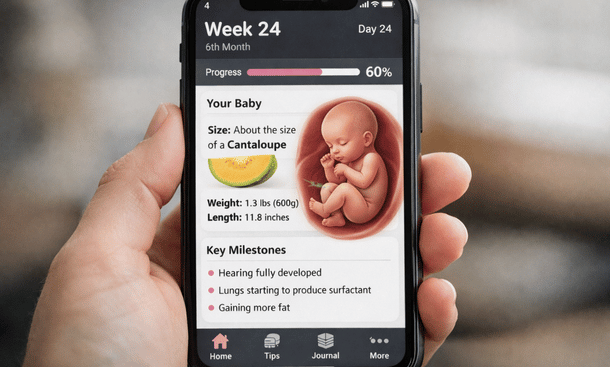
Week-by-Week Development Updates
This is the bread and butter of pregnancy tracking and honestly, if an app can’t nail this, what’s even the point? You want clear, accurate information about what’s happening with your body and your baby each week. Not just “your baby is the size of a kumquat” because let’s be real, when’s the last time you held a kumquat?
Good apps give you actual developmental milestones. They tell you when organs are forming, when your baby can hear your voice, when those practice contractions might start. The best ones cite medical sources instead of just making stuff up, which matters more than you’d think when you’re Googling symptoms at 2 AM convinced something’s terribly wrong.
Symptom and Mood Tracking
Y’know what’s impossible to remember? Whether that weird pulling sensation in your ribs started Tuesday or Thursday. Whether you’ve been exhausted for three days or three weeks. Your brain during pregnancy has the memory capacity of a goldfish on sedatives, so you need an app that remembers for you.
Look for customizable symptom logs where you can track everything from nausea intensity to Braxton Hicks frequency. Mood tracking is clutch too because pregnancy hormones will have you crying over a commercial for paper towels and you’ll want to show your partner it’s not just you being dramatic.
The real value kicks in at doctor appointments when they ask how you’ve been feeling. Instead of that vague “um, fine I guess?” you can pull up actual data. My OB loved when I could tell her I’d had heartburn twelve out of fourteen days or that my insomnia spiked right after week twenty.
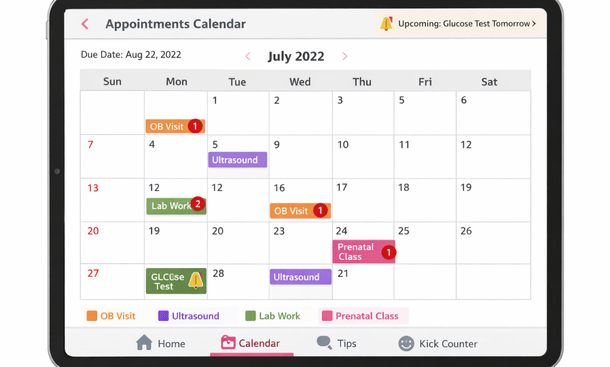
Appointment and Medication Reminders
Pregnancy comes with more appointments than a celebrity’s schedule. First trimester you’ve got that initial visit, maybe early ultrasounds if you’re high-risk or just anxious. Second trimester brings anatomy scans and glucose testing. Third trimester? You’re basically living at your doctor’s office with weekly checkups toward the end.
A solid app keeps this organized with calendar integration and reminder notifications. Same goes for prenatal vitamins, prescribed medications, or those seventeen supplements your holistic friend swore would change your life. Set it and forget it until your phone buzzes telling you to take your iron.
Contraction Timer
You don’t need this feature until suddenly you need it desperately. When labor starts, the last thing you want is fumbling through app menus trying to figure out how their timer works. Test this feature before you’re actually contracting because trust me, you won’t have the patience to learn it in the moment.
Good contraction timers are dead simple. One button to start, one to stop, automatic calculation of duration and frequency. The best ones let you share data directly with your birth partner or doctor. Some even have built-in guidance telling you when contractions are close enough to head to the hospital.
I used mine during false labor with my second kid and it saved us a pointless trip to the hospital at midnight. The app showed my contractions were irregular as hell and my OB confirmed over the phone I should stay home. Worth every penny of that premium subscription.
The Nice-to-Haves: Bonus Features That Might Win You Over
Hospital Bag Checklists
Look, you can find these lists anywhere online but having one built into your tracking app means you’ll actually use it. Around week thirty-five when nesting instinct hits hard, you’ll appreciate checking off items without switching between seventeen browser tabs.
Some apps let you customize these lists which is key because your needs differ based on birth plan, hospital policies, and personal preferences. I didn’t need the meditation music my app suggested but I definitely needed my own pillow and those specific granola bars that didn’t make me nauseous.
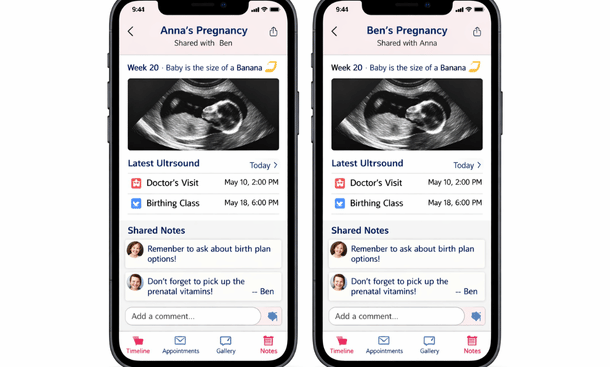
Partner Access and Sharing
This feature ranges from genuinely helpful to slightly creepy depending on execution. The good versions let you share appointment dates, ultrasound photos, and milestone updates with your partner or family. They can see what’s happening each week without you having to explain everything repeatedly.
The weird versions try to gamify your partner’s involvement with achievement badges for attending appointments or reading articles. My husband did not need an app congratulating him for basic participation in his own child’s gestation, thanks.
Nutrition and Meal Planning
This gets tricky because some apps go overboard with restrictive food lists that’ll stress you out unnecessarily. Yeah, you should probably skip the gas station sushi but you don’t need an app sending you push notifications every time you’re near a deli counter.
Better versions offer balanced guidance on nutrition needs, track your water intake without being preachy about it, and maybe suggest pregnancy-safe recipes when you’re too tired to think. My favorite feature was the food safety lookup where I could search specific items and get actual medical guidance instead of conflicting mom forum opinions.
Community Forums and Expert Q&A
Community features are hit or miss. When they’re good, you get support from other moms who actually understand what you’re going through. When they’re bad, you get anxiety-inducing horror stories and medical advice from people whose only qualification is they once watched a birth documentary.
I’d say this is more of a personality thing. Some women love the community aspect and find real friendship there. Others prefer keeping their pregnancy journey more private and just want the tracking tools. Neither approach is wrong, but know yourself before you invest in an app that’s heavily community-focused.
Features You Can Probably Skip
Daily Photos and Size Comparisons
Every app wants to show you how big your baby is compared to produce. Sometimes it’s useful for visualization. Mostly it’s just filler content. Do you really need to know your baby graduated from blueberry to grape to kumquat to avocado? After about week ten these comparisons stop meaning much anyway.
Daily bump photo prompts sound cute in theory but most of us don’t want to document every single day. Weekly is plenty if you’re into progress photos.
Shopping Integration and Registries
Unless an app is specifically designed around registry building, this feature usually feels tacked on. You’re better off using actual registry platforms that specialize in that. Pregnancy apps trying to do too much often do nothing particularly well.
Name Generators and Voting
This is peak unnecessary feature territory. You don’t need an algorithm suggesting baby names and you definitely don’t need strangers voting on your shortlist. Keep the name selection process between you and your partner, maybe a trusted friend or two. Apps aren’t going to crack the code on finding the perfect name for your kid.
How to Actually Choose Based on Features
Start with your priorities. Are you super organized and want every detail tracked? Or do you just want the basics without overwhelm? High-risk pregnancy requiring close monitoring? You’ll need more robust medical tracking than someone with an uncomplicated pregnancy.
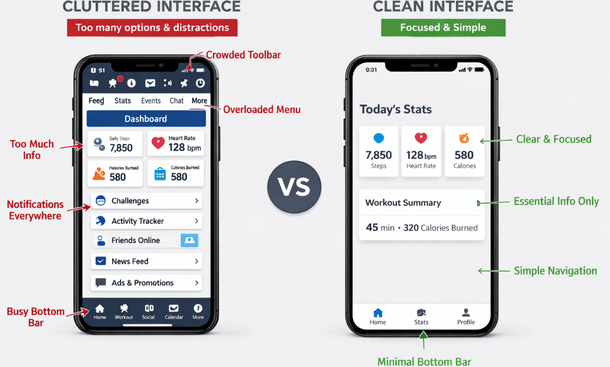
Download a few highly-rated options and actually use them for a week. Don’t just browse the feature list in the app store because what sounds good in theory might be annoying in practice. See which interface makes sense to your brain, which notifications feel helpful versus intrusive, and which features you naturally use versus ignore.
Pay attention to how data syncs across devices if you switch between your phone and tablet. Check if you can export your tracking data because that information belongs to you and you might want it for future pregnancies or just your records.
And honestly? If you find yourself overwhelmed by features, that’s feedback. A good pregnancy app should reduce your stress, not add to it. Sometimes the simpler option wins even if it has fewer bells and whistles.
The Bottom Line
After using probably a dozen different pregnancy apps across my own experiences and recommendations, I keep coming back to the same truth: features only matter if they actually help your specific situation. The app with the most features isn’t necessarily the best app. The best app is whichever one you’ll actually open every day without feeling like it’s homework.
Focus on rock-solid basics first: accurate developmental information, reliable tracking tools, appointment management, and a contraction timer that works when you need it. Everything else is bonus material that might enhance your experience or might just clutter your screen.
Before you commit to any single platform, it helps to see how these features stack up across different options and whether you’re better off with free versions or paid upgrades that unlock additional functionality. Our breakdown of free vs paid pregnancy app options shows you exactly what you get at different price points and which premium features actually justify the cost versus which ones are just marketing designed to separate you from your money when you’re already spending enough on preparing for this baby.
Now get out there and find an app that actually works for you instead of making you work for it.

As an author at Felyro.com, I create actionable content on pregnancy tracking, offering practical tools, tips, and insights that empower mothers-to-be to stay informed and confident throughout their pregnancy.